 Soku AI
On June 30, 2026, Google put Gemini Omni Flash into public preview for developers via the Gemini API and Google AI Studio. Most of the coverage framed it as "Google's answer to Sora" — a video model to argue about on benchmarks. That framing misses what actually matters to the people who make ads: Omni Flash is the first mainstream video model built around conversational editing, and it lands at the exact price of Veo 3.1 Fast. For an ad team, "generate a clip, then say swap the product and keep the scene" is a different production economics than "re-roll the prompt and pray."
This is the pillar. It gives you the whole map — what the model is, what it costs, how the image-to-video pipeline works, where it wins and loses against the other 2026 models for ad creative specifically, the click-by-click setup for Meta and Google placements, and the operating model to run it in without torching your budget or your brand. For the ranked model shootout against Veo, Seedance, and Sora, see the companion comparison in Where to go next.
The 60-second version
- *It generates and edits video. Omni Flash produces up to 10-second, 720p clips from text, image, and video inputs, and — the headline feature — lets you refine them by conversation* through the Interactions API instead of re-rolling from scratch (Google AI).
- Pricing is $0.10 per second of output — the same as Veo 3.1 Fast, and priced as $17.50 per 1M output tokens with input at $1.50 per 1M (Gemini API pricing). There is no free tier; every second costs from the first clip.
- It pairs with Nano Banana 2 Lite (
gemini-3.1-flash-lite-image, ~4-second images at $0.034 each) as the cheap ideation front-end: draft the still, animate the winner. - Two ad-native aspect ratios ship on day one: 9:16 portrait and 16:9 landscape (the default) — the two ratios that cover Reels, Shorts, Stories, and in-feed.
- Every output carries a SynthID watermark, verifiable in the Gemini app, Chrome, and Search — which matters for disclosure-sensitive advertising.
- The real limits are honest ones: 720p ceiling (Veo does 4K), character consistency still drifts on hard scene changes, audio references and video extension aren't in the API yet, and it's English-only for now.
The takeaway for marketers: Omni Flash doesn't win on raw fidelity. It wins on iteration speed — and iteration speed is what actually decides how many ad variants a team can ship per week.
What Gemini Omni Flash actually is
Omni Flash is the member of Google's Gemini family "where Gemini's multimodal reasoning meets video generation and editing" (Google AI). Practically, three things distinguish it from a plain text-to-video model:
- Multimodal referencing. You can condition a generation on a combination of text, images, and short video — so a product still, a brand color reference, and a motion prompt can all steer one clip.
- Conversational editing. Through the Interactions API, each turn chains off the last via a
previous_interaction_id. The model "remembers the video context, applying your changes while preserving elements you did not mention." That is the difference between editing and regenerating. - A world-model backbone. Google claims improved intuitive understanding of gravity, kinetic energy, and fluid dynamics, plus character persistence — a face, outfit, and voice introduced in one shot are meant to carry across cuts within a conversation.
The model id is gemini-omni-flash-preview, and it is available across Google AI Studio, the Gemini API, the Gemini Enterprise Agent Platform, the Gemini app, and Google Flow (Gemini API docs).
Pricing, in ad-team terms
List price is simple; batch economics are what bite. Omni Flash bills $0.10 per second of 720p output. A 5-second clip is $0.50; a 10-second clip is $1.00. Inputs (text, image, or video) are a flat $1.50 per 1M tokens, and each conversational edit turn bills as a new generation — you pay per second again for the re-rendered clip.
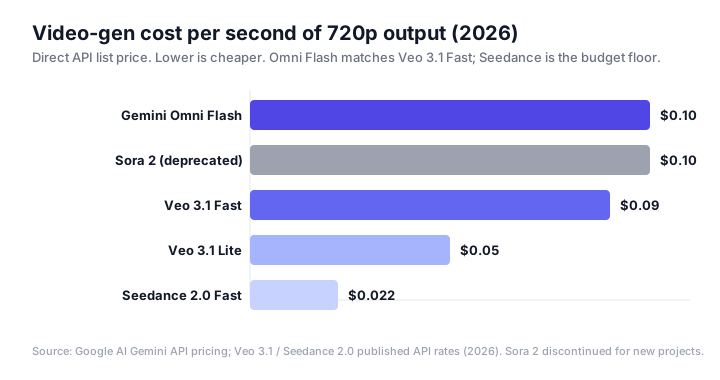
The number that matters for a paid-social program isn't the per-second rate — it's the variant multiplier. A disciplined creative test is dozens of angles across two or three ratios. At $0.80 per 8-second clip, a 30-angle × 3-ratio batch is ~$72 before a single edit; the same batch on Seedance 2.0 Fast is ~$16. Omni Flash is not the model you brute-force 500 throwaway variants on. It's the model you reach for when a concept is close and you want to converge it fast. For a fuller breakdown of when the premium pays off, see the ranked comparison.
The image-to-video pipeline: Nano Banana 2 Lite → Omni Flash
Google shipped Omni Flash alongside Nano Banana 2 Lite deliberately. Lite (gemini-3.1-flash-lite-image) produces 1K-resolution stills in about 4 seconds at $0.034 each — cheap and fast enough to explore a concept space. The intended flow is: ideate the frame in Lite, hand the winning still to Omni Flash as a reference, animate it, then refine by conversation.
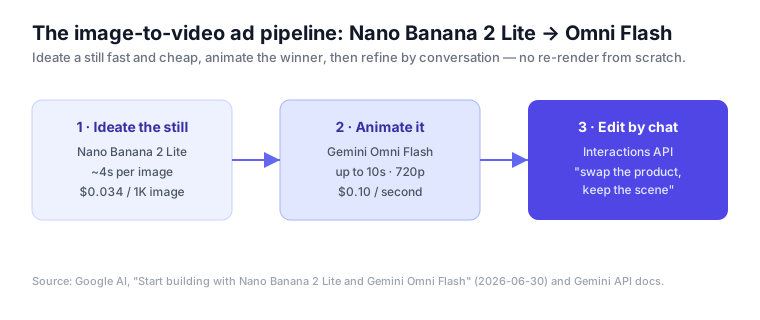
This matters because it fixes the most expensive mistake in AI video: paying video rates to explore. Stills are two orders of magnitude cheaper than seconds of video. Doing your divergent thinking in Lite (or in Google's Nano Banana 2 tool) and only animating what already looks right is the single biggest cost lever with this model.
Where Omni Flash fits against the 2026 field (for ads)
There is no "best" video model in 2026 — there is a best model for a given constraint. Here's the honest shape of the field for advertising work, at a section's depth; the full ranked shootout has the scoring.
| Model | Max length / res | ~$/sec | The ad-creative case |
|---|---|---|---|
| Gemini Omni Flash | 10s · 720p | $0.10 | Best for converging a near-final concept via conversational edits; two ad ratios native |
| Veo 3.1 Fast | longer · up to 4K | $0.09 | Best when you need higher fidelity / resolution and native audio |
| Veo 3.1 Lite | 720p | $0.05 | Cheapest Google tier for volume drafts |
| Seedance 2.0 Fast | 30s native | $0.022 | Best for high-volume variant generation on a budget (try it alongside other tools) |
| Sora 2 | — | — | Deprecated for new projects; no longer a viable production path |
Two practical reads. First, Omni Flash and Veo 3.1 Fast are priced within a penny of each other, so the choice between them is about capability fit (editing vs resolution/audio), not cost. Second, if your program is defined by sheer variant volume rather than polish, the budget models still win the math — Omni Flash earns its price only when iteration quality beats iteration quantity.
The honest limitations
An ad team should walk in knowing what breaks:
- 720p ceiling. Fine for social feeds; a real constraint for large-format or broadcast-adjacent placements. Veo's 4K is the lever there.
- Character consistency drifts. Google is explicit that consistency "when changing scenes or panning has limitations." A recurring spokesperson across very different shots is not yet reliable.
- Editing is not free. Each conversational turn re-renders and re-bills per second. "Iterate cheaply" means fewer, better turns — not unlimited fiddling.
- API gaps. Audio references, scene extension, and multi-video referencing are not yet supported in the Gemini API; video references up to 3 seconds are accepted by the schema but "not correctly processed currently" (docs).
- English-only, with regional rules. Non-English prompts are untested, and there are regional restrictions (EEA, Switzerland, UK) on uploading recognizable people or minors for editing.
- No free tier. You cannot pilot Omni Flash for $0 — budget a small paid test before committing a workflow to it.
Setting it up for Meta and Google ads
Getting from an API key to a clip that's ready for a placement is five steps. None of them are hard — what trips teams up are the ad-specific settings the generic docs skip.
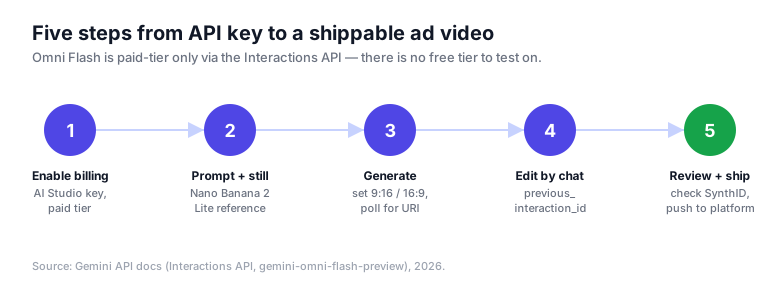
1. Get a paid API key. Create a key in Google AI Studio, enable billing on the project — the preview model rejects free-tier keys — and confirm access to model id gemini-omni-flash-preview. The endpoint you'll call is the Interactions API, the one Google recommends for its latest video features (docs):
https://generativelanguage.googleapis.com/v1beta/interactions?key=$API_KEY2. Ideate the still in Nano Banana 2 Lite first. Generate several still directions, pick the winner, and pass it to Omni Flash as a reference image. This is the cost lever described above, and it belongs in the setup as a default habit, not an optimization you get to later.
3. Generate at the right ad ratio. 16:9 is the default, so vertical placements have to be set explicitly:
9:16— Reels, Shorts, Stories, TikTok, vertical in-feed.16:9— YouTube in-stream, landscape placements, most Google Demand Gen video.
A minimal generation request sets the prompt, the reference still, and the response format. Keep the clip to the length the placement actually needs — you pay $0.10 for every second:
{
  "model": "gemini-omni-flash-preview",
  "prompt": "A 6-second product hero: the bottle rotates slowly on a marble counter, soft morning light, shallow depth of field",
  "reference_images": ["<nano-banana-still>"],
  "response_format": { "type": "video", "aspect_ratio": "9:16" }
}
For videos over 4MB, request URI delivery and poll until the asset reaches an ACTIVE state:
"delivery": "uri"Two gotchas worth knowing before you wire anything up: negative prompts aren't a separate field — put "no text, no logo" directly in the prompt — and system instructions, temperature, and top_p are not supported on this model.
4. Refine by conversation, not by re-rolling. Instead of rewriting the prompt, chain the edit off the previous result with previous_interaction_id. The model keeps everything you don't mention:
{
  "model": "gemini-omni-flash-preview",
  "previous_interaction_id": "<id-from-step-3>",
  "prompt": "Swap the marble counter for a wooden kitchen table, keep the bottle and the lighting"
}
Because each turn re-renders and re-bills per second, batch your changes into few, deliberate instructions rather than many small ones. Ad edits that work well as single turns:
- "Change the background to a summer beach, keep the product and framing."
- "Make the pacing 20% slower and hold the final logo frame longer."
- "Swap the packaging to the new blue label, keep everything else."
Keep edits inside a coherent scene when the subject has to stay identical — consistency across hard scene changes is where drift shows up.
5. QA the watermark, then ship to platforms. Before anything goes live: confirm the SynthID watermark is present (verify in the Gemini app, Chrome, or Search — for AI-disclosure-sensitive categories this is part of QA now), run brand and claims review with a human, then export at the placement's spec and push — Meta Advantage+ / Advantage+ Creative for social, Google Demand Gen or Performance Max video assets for Google.
What conversational editing changes for ad creative teams
The launch is usually read as a fidelity story. For a team that actually ships ads, three things change about how the work is organized — and one thing deliberately doesn't.
Iteration replaces re-rolling. The old text-to-video loop was lossy: you wrote a prompt, got a clip, disliked one thing, changed the prompt, and got a different clip — often losing the parts you liked. Every iteration was a gamble against your own budget. Chained edits break that loop, which means the output metric that moves is concept-to-final time, not clips-per-dollar.
Budget discipline becomes a real skill, not an afterthought. With no free tier and every edit turn re-billing per second, sloppy iteration is a line item. A team that "just keeps tweaking" will spend more editing one hero clip than generating a whole batch of drafts on a budget model. The winning pattern: diverge cheap in stills, animate only the survivors, converge in few deliberate turns. The skill that used to be "prompt engineering" is now knowing when to stop editing.
Ideation and production become different surfaces. Stills are now your ideation surface and video is your production surface — different models, different costs, and the hand-off between them is where creative judgment lives. The person who picks which still gets animated is doing the highest-leverage work in the pipeline. That's an org change, not just a tooling one.
What it does not change: the human gate still owns brand and claims. Conversational editing makes it dangerously easy to produce a polished, on-brand-looking clip in minutes, and that raises the stakes on review rather than lowering them. A model that faithfully "keeps the scene" will just as faithfully keep a wrong logo lockup or an unsubstantiated claim. Faster generation means more to review, not less.
The net production loop is short enough to put on a wall: diverge in stills, converge in conversation, gate before you ship. Teams that restructure around it turn the model's iteration speed into more shipped variants per week. Teams that treat Omni Flash as a fancier text-to-video box will overpay to fiddle.
The operating model: let the model generate, let the agent run the program
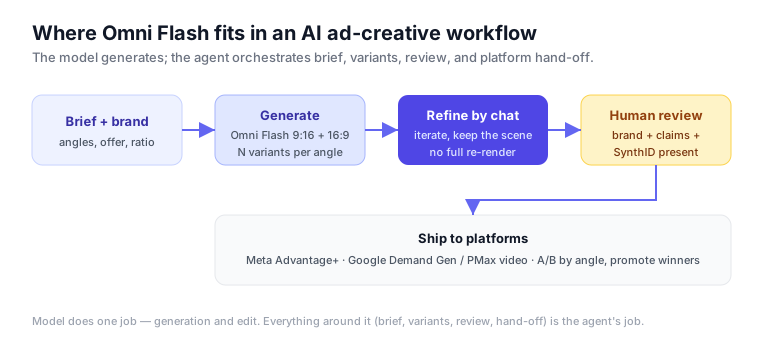
The mistake teams make with any new video model is treating it as the whole workflow. It isn't. Omni Flash does exactly one job well — generate and edit a clip. Everything around that job — turning a brief into prompts, fanning out variants across angles and ratios, gating for brand and claims, checking the SynthID watermark is present, and pushing approved cuts into Meta Advantage+ or Google Demand Gen — is orchestration.
That orchestration layer is where an AI ad-automation agent earns its keep. The model is a capability; the agent is the operating system around it: it holds the brand brief, decides how many variants to spend on, keeps a human in the loop before anything ships, and closes the loop by promoting the variants that actually perform. This is the same pattern we describe for evaluating the best AI tools for Meta ad creative — the tool is never the strategy.
Soku runs Omni Flash inside exactly this envelope: brief in, variants generated and conversationally refined, human review before spend, and platform hand-off with attribution — so the model's iteration speed turns into shipped, measured ads instead of a folder of clips.
Where to go next
This pillar is the map — model, pricing, pipeline, setup, and the team operating model are all above. The one deep dive that lives outside it:
- Gemini Omni Flash vs Veo 3.1 Fast vs Seedance vs Sora, Ranked for Ad Creative — the scored shootout on cost, ratios, editing, fidelity, and variant economics.
FAQ
Is Gemini Omni Flash free? No. It's paid-tier only on the Gemini Developer API at $0.10 per second of output; there is no free allowance.
What resolution and length does it output? Up to 10-second clips at 720p, in 9:16 or 16:9. Longer durations are "coming soon" per Google; 4K is not available (Veo 3.1 covers that need).
How is it different from Veo 3.1? Same ballpark price ($0.10 vs $0.09/sec), but Omni Flash centers on conversational editing while Veo leads on resolution (up to 4K) and native audio. Pick by capability, not cost.
What is conversational editing? Through the Interactions API, you chain edits with previous_interaction_id; the model applies your change while preserving what you didn't mention — no full re-render conceptually, though each turn does re-bill per second.
Does it watermark output? Yes — an invisible SynthID watermark on every clip, verifiable via the Gemini app, Chrome, and Google Search. Useful for AI-disclosure-conscious advertising.
Can it keep the same character across an ad? Within a conversation, mostly — but Google notes consistency degrades across hard scene changes and panning, so don't rely on it for a spokesperson across very different shots yet.