 Soku AI
On 2026-10-07 OpenAI's ChatGPT Ads documentation picked up a change that most advertisers will not notice until their reports move. The developer guide for product feeds now points to a new, explicit parameter precedence model, introduces account tracking settings as a level, describes a Legacy ordering for product-feed URLs, and sets a deadline: accounts on Legacy ordering must migrate by November 5, 2026.
The practical effect is narrow but sharp. If a product's feed URL and your campaign settings both set the same query key, the winner flips when you migrate. Under Legacy, the feed URL won. Under the new mode, the campaign, ad group, ad or account setting wins. That applies to utm_* keys and to every custom key your site might read.
This article quotes OpenAI's wording exactly, works through what the final URL looks like under each ordering, and lays out a pre-deadline checklist. Facts drawn from OpenAI's documentation are labeled as such. Anything that is our interpretation is labeled Soku analysis. Where the documentation is silent, we say so.
Last verified: 2026-10-07.
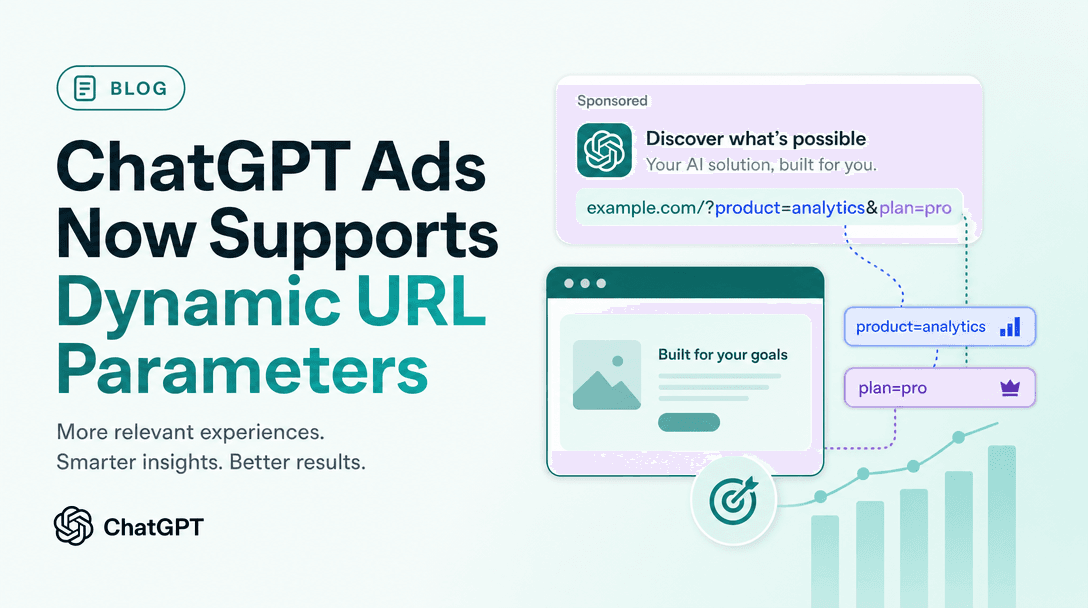
If you are new to how ChatGPT Ads macros work, read our earlier piece on ChatGPT Ads dynamic URL parameters first. That article covers the macros themselves. This one covers what happens when two levels disagree.
What changed on 2026-10-07
Soku captures OpenAI's ChatGPT Ads Help Center and developer documentation every day. Comparing the capture taken at 00:36 UTC on 2026-10-06 with the one taken at 00:20 UTC on 2026-10-07, two pages changed in ways that matter for tracking.
Developer docs: Product Feeds
The product-feed guide at developers.openai.com/ads/product-feeds previously said:
To add tracking parameters to product URLs, use
landing_page_configurationon the campaign, ad group, or ad. See the Campaigns reference.
It now says:
To add tracking parameters to product URLs, use account tracking settings or
landing_page_configurationon the campaign, ad group, or ad. Individual products have no separate configurable ad entity; the ad's tracking settings apply to their destinations. See tracking parameters for parameter precedence, Legacy behavior, examples, and migration guidance.
Three things are new in that paragraph: account tracking settings as a source of parameters, the statement that products have no separately configurable ad entity, and a pointer to a section covering precedence, Legacy behavior and migration.
Help Center: Create Ads for ChatGPT Ads
The landing-page best-practice bullet in Create Ads for ChatGPT Ads previously read:
Add tracking parameters directly to destination URLs: you can include your own UTM parameters for each creative
It now reads:
Add tracking parameters directly to destination URLs: you may add UTM tags to individual creative URLs. When checking an ad link in ChatGPT's iOS in-app browser, use Share to copy the full link and inspect its tracking parameters. The displayed hostname alone does not show the complete URL.
The page showed "Updated: 4 hours ago" in our 00:20 UTC capture, which places the edit on the evening of 2026-10-06 UTC. The rest of the article was unchanged apart from a new related-articles block.
The section the product-feed page points to
The target of that new link, the Tracking parameters section of Campaign Management, is not one of the pages our monitor has historically captured, so we cannot say when it was first published. We read it live on 2026-10-07. Everything in the next section comes from it.
The new precedence model, in OpenAI's words
The section opens by naming the field and the levels:
Add
landing_page_configuration.query_string_templateat the campaign, ad-group, or ad level where available. Account tracking settings also provide defaults. For product feeds, the ad's tracking settings apply to product destinations; individual products have no separate configurable ad entity.
It gives this example template:
{
  "landing_page_configuration": {
    "query_string_template": "utm_source=openai&utm_campaign={campaign_id}&utm_content={ad_id}&click_id={oppref}"
  }
}
Then the combining rule:
Parameters from different levels combine. When the same query key appears at more than one level, the highest-priority value wins. This applies to all query keys, including custom keys, not only
utm_*parameters.
And the order itself:
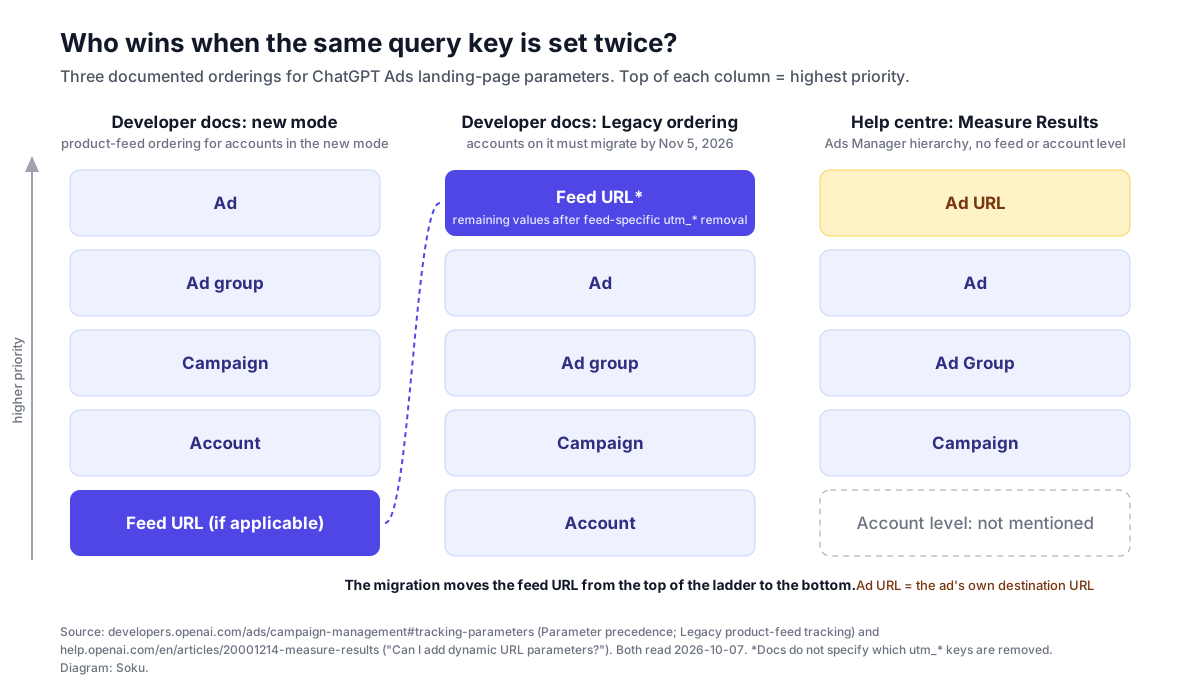
Precedence from lowest to highest is:
Feed (if applicable) < Account < Campaign < Ad group < AdConfigured parameters override matching keys in the feed URL. Feed parameters without a matching configured key remain in the final URL. An ad-level value overrides a matching ad-group, campaign, or account value.
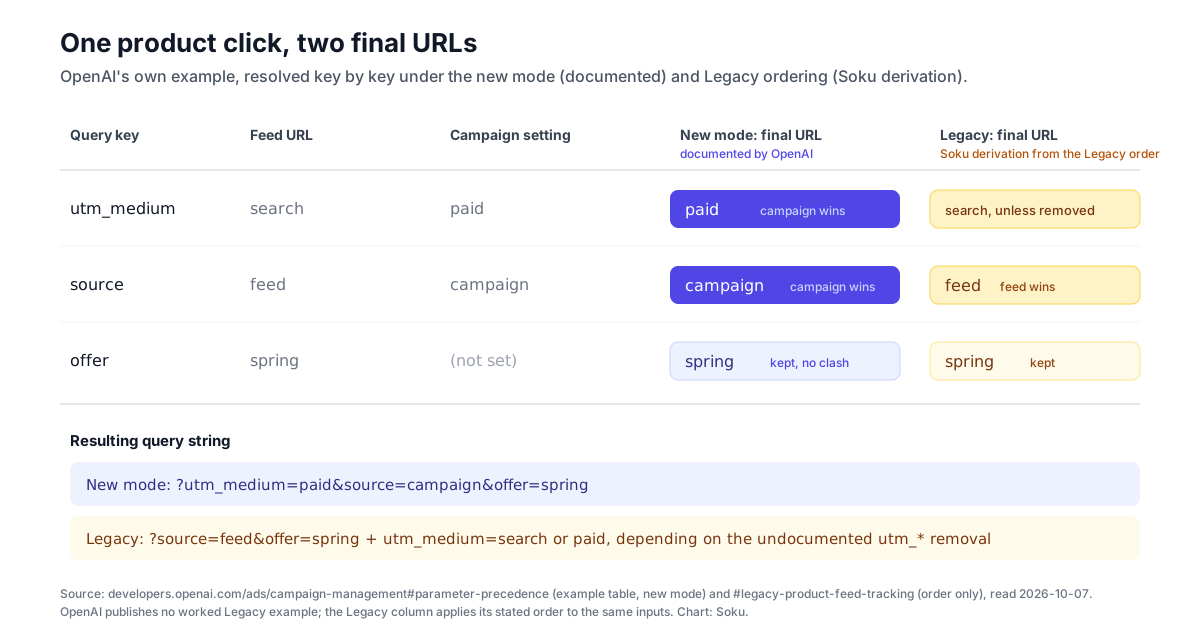
OpenAI's own one-line example: "feed utm_medium=search plus campaign utm_medium=paid produces utm_medium=paid." Its worked table, reproduced exactly:
| Source | Query parameters |
|---|---|
| Feed URL | utm_medium=search&source=feed&offer=spring |
| Campaign tracking settings | utm_medium=paid&source=campaign |
| Final URL | utm_medium=paid&source=campaign&offer=spring |
The campaign replaces
utm_mediumandsource. The unmatched feed parameteroffer=springstays in the final URL.
The scope sentence that ties it to the deadline:
The product-feed ordering below applies to accounts using the new mode. Accounts using Legacy ordering must migrate by November 5, 2026.
What Legacy ordering did
The Legacy section is two sentences and one line of order:
After any feed-specific removal of
utm_*parameters, Legacy ordering gives remaining feed URL values the highest priority. Precedence from lowest to highest is:
Account < Campaign < Ad group < Ad < Feed
So under Legacy, a key that survived in a product's feed URL beat the same key configured anywhere else. The new mode moves the feed from the top of the ladder to the bottom. Nothing else in the order changes. Account, campaign, ad group and ad keep the same relative positions in both.
Note the qualifier "after any feed-specific removal of utm_* parameters". OpenAI does not say which utm_* keys were removed, under what conditions, or whether that removal applied to every feed. We come back to this under limits and unknowns, because it determines how much your reporting will move.
How to migrate, as documented
Account admins can select Switch now in the Feed tracking is changing banner in Ads Manager to opt in. Other users see Switch now but can't select it and should ask an account admin to opt in.
That is the entire migration procedure in the documentation. There is no API field documented for checking or changing the mode, and no statement about what happens on November 5 to accounts that have not switched.
Worked example: one product, five levels, two final URLs
OpenAI's table shows two levels. Real accounts usually have more. Here is a fuller scenario using the documented rules. The inputs are illustrative. The resolution in the "new mode" column follows directly from OpenAI's stated order. The Legacy column is Soku analysis: it applies OpenAI's stated Legacy order to the same inputs, because OpenAI publishes no worked Legacy example.
Assume a product row whose feed url is:
https://shop.example.com/p/trail-x?utm_source=google&utm_medium=[cpc](/glossary/cpc)&sku=TX-42&color=blueAnd these configured query_string_template values:
- Account:
utm_source=chatgpt&utm_medium=paid - Campaign:
utm_medium=paid_ai&utm_campaign={campaign_id} - Ad group:
utm_term={ad_group_id} - Ad:
utm_campaign=spring_feed&utm_content={ad_id}
| Key | Feed URL | Account | Campaign | Ad group | Ad | New mode final | Legacy final (Soku analysis) |
|---|---|---|---|---|---|---|---|
utm_source | google | chatgpt | chatgpt | google if it survived the feed-specific utm_* removal, otherwise chatgpt | |||
utm_medium | cpc | paid | paid_ai | paid_ai | cpc if it survived the removal, otherwise paid_ai | ||
utm_campaign | {campaign_id} | spring_feed | spring_feed | spring_feed | |||
utm_term | {ad_group_id} | {ad_group_id} | {ad_group_id} | ||||
utm_content | {ad_id} | {ad_id} | {ad_id} | ||||
sku | TX-42 | TX-42 | TX-42 | ||||
color | blue | blue | blue |
Read the table row by row and three patterns emerge.
- Keys set in only one place never change.
utm_term,utm_content,skuandcolorresolve the same way under both orderings. OpenAI states it directly for the new mode: "Feed parameters without a matching configured key remain in the final URL." - Collisions among configured levels never change.
utm_campaignis set at campaign and ad level. The ad wins in both orderings, because the relative order of account, campaign, ad group and ad is identical in both. - Only feed-versus-configured collisions flip.
utm_sourceandutm_mediumare the only rows whose outcome depends on the mode, and under Legacy even those depend on a removal step OpenAI does not describe.
Macros such as {campaign_id} are shown unresolved. OpenAI's Help Center says "Ads Manager populates supported macros automatically at delivery time." The documentation does not say in what order keys appear in the final query string, so do not build parsing that relies on position.
Soku analysis: why migrating can silently change your analytics
Everything in this section is our interpretation of the documented rules. OpenAI does not discuss GA4 or any analytics product on the tracking-parameters page.
The change is invisible in Ads Manager and visible only downstream. Switching the ordering does not change a single field you configured. The campaign settings look identical before and after. What changes is the URL a person lands on, and therefore what your analytics tool records. Nobody looking at Ads Manager would see a difference.
Product feeds are often built for another channel first. Many retailers generate one catalog and reuse it. A product URL in a feed originally built for a shopping channel elsewhere can carry that channel's utm_source and utm_medium. Under Legacy, if those keys survived OpenAI's feed-specific removal, ChatGPT clicks could have been recorded under the other channel's source and medium. After migration, your configured values win and the same clicks move to a new source/medium pair. In a channel report that looks like traffic leaving one channel and appearing in another on the day an admin pressed Switch now.
Custom keys are not just analytics. OpenAI is explicit that the rule "applies to all query keys, including custom keys, not only utm_* parameters." Sites often read query parameters for things other than reporting: a coupon or offer code, a referral or affiliate tag, a variant selector, a region or currency switch. If the same key is set in the feed URL and at any configured level, the configured value will replace the feed value. If your site uses that parameter to choose what to show, the landing page itself can change, not just the report.
{ad_id} will not tell products apart. OpenAI says individual products have no separate configurable ad entity, and the product-feed guide says each product-feed ad group can contain at most one non-archived product-ad template. Our reading: in a product-feed campaign, {ad_id} identifies the template ad, which serves many products, so it cannot be your product key. The product identifier has to come from the feed URL itself, under a key you do not also configure at a higher level, so it survives as an unmatched parameter.
Consistency improves after the switch. Under the new mode, product-feed ads follow the same "configured settings win, more specific level wins" logic as the rest of your tracking. Your account and campaign templates become the single source of truth for any key they set, which is easier to govern. For naming that holds up across channels, see our guide to UTM naming conventions for paid media.
Where the Help Center and developer docs disagree
We read OpenAI's Help Center on the same day to see whether it reflects the new model. It does not fully.
The Help Center's Measure Results article, under "Can I add dynamic URL parameters?", read live on 2026-10-07, says:
You can configure query parameters from the three-dot menu on the Campaigns, Ad groups, or Ads page by selecting Edit campaign, Edit ad group, or Edit ad. In the edit modal, use Landing page query parameters to add the parameters you want appended to landing page URLs.
More specific settings take precedence. The hierarchy is: Ad URL, then Ad, then Ad Group, then Campaign. If a parameter is already set at the Ad URL level, campaign, ad group, or ad-level settings will not overwrite it.
Compare that with the developer docs:
| Topic | Help Center (Measure Results) | Developer docs (Campaign Management) |
|---|---|---|
| Levels named | Ad URL, Ad, Ad Group, Campaign | Feed (if applicable), Account, Campaign, Ad group, Ad |
| Account-level tracking settings | Not mentioned | "Account tracking settings also provide defaults." |
| URL already carrying the key | Ad URL wins: "will not overwrite it" | Feed URL loses in the new mode: "Configured parameters override matching keys in the feed URL." |
| Product feeds | Not mentioned | Covered, with new mode and Legacy |
| Legacy ordering and Nov 5 deadline | Not mentioned | Documented |
| Macros listed | {campaign_id}, {ad_group_id}, {ad_id}, {ad_account_id} | Examples use {campaign_id}, {ad_id} and {oppref} |
These are not strictly contradictory, because they may describe different destinations. The Help Center's "Ad URL" is the destination URL of a standard ad. The developer docs' "Feed" is a product URL in a feed. But the two pages leave a real gap.
- The developer docs do not place a standard ad's own URL query string in their order. Their ladder begins with "Feed (if applicable)". For a standard
chat_cardad with atarget_urlthat already carriesutm_source, the developer page is silent. The Help Center says that value wins. - The Help Center does not mention account-level settings at all. An advertiser following only the Help Center would not know an account default exists or that it can supply keys.
- Soku analysis: the Help Center's "Ad URL wins" rule for standard ads looks like Legacy feed behavior, where the URL also won. After migration, product-feed ads and standard ads will resolve URL-versus-setting collisions in opposite directions. If you run both, treat them as two different rules.
On macros: our earlier coverage noted that oppref was not among the Help Center's listed macros. The developer docs now use click_id={oppref} in their own query_string_template example. The Help Center list is still the four ID macros. We would treat {oppref} as documented by example on the developer side, and verify it resolves on a real click before relying on it. OpenAI's Measurement Pixel documentation separately says the Pixel "captures oppref from the landing page URL", so whatever template you use, do not strip or rename an incoming oppref parameter on redirect. Our ChatGPT Ads attribution guide covers how oppref feeds conversion matching.
We also checked the developer API reference pages for campaigns, ad groups and ads. As read on 2026-10-07, none of their field tables lists landing_page_configuration or query_string_template. The field appears in the Campaign Management guide's create-campaign example and tracking section only. The account reference does not document an account tracking settings field either.
Who is affected
Based on the documentation, the deadline applies to accounts using Legacy ordering, and Legacy is described specifically as product-feed tracking. In practice:
- Product-feed advertisers whose feed URLs carry query parameters are the core group. If any key in your product URLs is also set at account, campaign, ad group or ad level, its outcome will change when you migrate.
- Product-feed advertisers with clean feed URLs (no query string) or with no configured tracking should see no change from the ordering switch itself, because nothing collides. That is our inference from the stated rules.
- Advertisers running only standard ads are not described as affected by the Legacy migration. The precedence line says "Feed (if applicable)", and the Legacy section is titled "Legacy product-feed tracking". They should still note the account-level default that the developer docs now mention.
- Teams using measurement partners that require their own parameters should pay attention. OpenAI's partner integration articles tell advertisers to put partner parameters in campaigns' Landing page query parameters (Northbeam, Rockerbox) or to keep dynamic parameters in the Tracking parameters field (AppsFlyer). If a partner key is also present in feed URLs, the configured value wins after migration.
If you have not set up product-feed campaigns yet, our guide to creating ChatGPT Ads campaigns from product feeds walks through the structure this article assumes.
Pre-November 5 migration checklist
The goal is a switch where nothing in your reports moves unless you decided it should. The steps are Soku's recommended process. The UI names and rules they rely on are OpenAI's.
- Confirm whether you are on Legacy. OpenAI documents a Feed tracking is changing banner in Ads Manager with a Switch now button. It does not document another way to check the mode, so look for the banner while signed in, and ask an account admin if you cannot select the button.
- Export every feed URL and list its query keys. Your catalog follows OpenAI's product file schema, which includes a
urlcolumn. Parse every product URL and build a list of distinct query keys and their values. Pay attention toutm_source,utm_mediumand any custom keys your site reads. - List every configured tracking template. Record the parameters at the account level and in Landing page query parameters for every product-feed campaign, ad group and ad. Through the API, retrieve each resource and record its
landing_page_configuration. The API reference does not list the field, so confirm it appears in your responses rather than assuming. - Compute the collision set. For each product-feed campaign, intersect feed keys with configured keys. Only those keys change outcome on migration. If the set is empty, the switch should not change your URLs.
- Decide the intended winner for each collision. For analytics keys, the configured value is usually what you want, because it is controlled in one place. For functional keys (offer, variant, region, referral), decide whether the per-product feed value must survive.
- Remove ambiguity before switching. If the feed value should win, rename or remove the configured key so there is no collision. If the configured value should win, remove the key from the feed URL so the outcome is identical under both orderings. Either way, the switch becomes a no-op for that key.
- Keep a per-product identifier in the feed under a unique key. Because products have no separately configurable ad entity, the feed URL is the only per-product carrier. Use a key you never configure at a higher level so it remains as an unmatched parameter.
- Record a before snapshot. Save a week of analytics sessions by source, medium and campaign for ChatGPT Ads traffic, plus a sample of real final URLs (see the next section).
- Have an admin switch at a chosen time. Do not let a deadline choose your change date. Pick a quiet day, switch, and record the exact time.
- Annotate and compare. Mark the switch date in your analytics tool. Compare source/medium distribution for the week before and after. Any movement you did not plan is a collision you missed.
For GA4-specific setup, including how ChatGPT Ads traffic is grouped, see our ChatGPT Ads GA4 integration guide.
How to verify a live ad's final URL
OpenAI added a specific instruction to the Help Center on 2026-10-06:
When checking an ad link in ChatGPT's iOS in-app browser, use Share to copy the full link and inspect its tracking parameters. The displayed hostname alone does not show the complete URL.
That sentence answers a real problem. In the iOS in-app browser, the address area shows the hostname, which tells you nothing about which query keys arrived. Copying the link via Share gives you the full URL to inspect.
A practical verification routine, as Soku analysis:
- Check before and after switching. Copy the full URL from at least one product ad in each product-feed campaign on both sides of the switch. Compare keys and values against your collision list.
- Confirm macros resolved. A literal
{campaign_id}in a final URL means the macro did not populate. - Check your server logs. Your web server sees the full request URL regardless of what the browser displays. Filtering logs for an
opprefparameter or yourutm_sourcevalue is a quick way to sample real ChatGPT Ads landings at scale. - Do not rely on previews. OpenAI's Campaign Management guide says: "A preview shows appearance; it does not confirm serving eligibility." It does not say a preview reflects the final tracking URL.
Limits and unknowns
These are gaps in the documentation as read on 2026-10-07. They are statements about the docs, not about how the product behaves.
- What happens on November 5. OpenAI says Legacy accounts "must migrate by" that date. It does not say whether accounts are switched automatically, whether delivery is affected, or whether anything else happens.
- Whether switching is reversible. Not stated.
- *What the Legacy "feed-specific removal of `utm_
parameters" removed.** Not stated. This is the single biggest unknown, because it determines whether your feedutm_*` values were reaching your site under Legacy at all. - How to read the current mode via API. No field is documented.
- Where account tracking settings are configured. The developer docs say they "provide defaults". Neither the Help Center nor the account API reference documents a UI path or field.
- Where a standard ad's own URL sits in the developer-docs order. The Help Center says the Ad URL wins. The developer docs do not mention it.
- Key order, encoding and length behavior in the merged URL are not documented. OpenAI's Campaign Management guide does state that ad destination URLs must be HTTP or HTTPS and no longer than 2,048 characters; whether that limit applies before or after parameters are merged is not stated.
- When the Campaign Management tracking section was first published. It was not in our monitored set before today, so we cannot date it.
- No advertiser email cited. OpenAI may have notified advertisers by email. We did not have access to one for this article and do not cite one.
What we will be watching
We will keep comparing the Help Center and developer docs daily. The changes that would matter most: the Help Center adopting the account level and the feed rules, a documented API field for the tracking mode, a description of what the Legacy utm_* removal did, and any statement about accounts that miss November 5. If any of those appear, this article will be updated and the "Last verified" date will change.
Sources
All read or captured on 2026-10-07 unless noted.
- OpenAI developer docs, Product Feeds: https://developers.openai.com/ads/product-feeds (previous wording from Soku's capture at 00:36 UTC on 2026-10-06; new wording from the capture at 00:20 UTC on 2026-10-07)
- OpenAI developer docs, Campaign Management, Tracking parameters: https://developers.openai.com/ads/campaign-management#tracking-parameters (parameter precedence, Legacy product-feed tracking, moving from Legacy, ad previews)
- OpenAI developer docs, API reference: Campaigns, Ad groups, Ads, Ad Account
- OpenAI developer docs, Measurement Pixel: https://developers.openai.com/ads/measurement-pixel (
opprefcaptured from the landing page URL) - OpenAI Help Center, Create Ads for ChatGPT Ads: https://help.openai.com/en/articles/20001212-create-ads-for-chatgpt-ads (previous wording from the 2026-10-06 capture)
- OpenAI Help Center, Measure Results: https://help.openai.com/en/articles/20001214-measure-results (dynamic URL parameters, macros, hierarchy)
- OpenAI Help Center, Set up Measurement Partner Integrations: https://help.openai.com/en/articles/20001416-set-up-measurement-partner-integrations and Set up Mobile Measurement Partner Integrations: https://help.openai.com/en/articles/20001372-set-up-mobile-measurement-partner-integrations
Last verified: 2026-10-07, against Soku's daily captures of OpenAI's ChatGPT Ads Help Center and developer documentation (2026-10-06 00:36 UTC and 2026-10-07 00:20 UTC) and a live read of the Campaign Management, Product Feeds, API reference, Create Ads and Measure Results pages the same day. Quotations are verbatim. Sections labeled Soku analysis are our interpretation and are not OpenAI statements.