 Soku AI
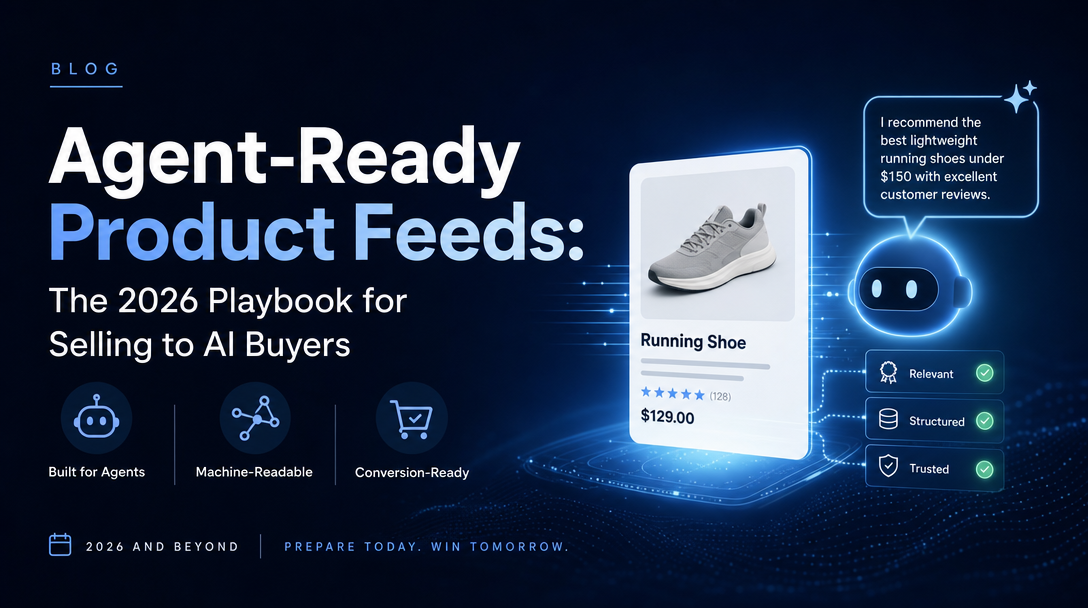
For twenty years, the job of a product page was to convince a human. Good photography, persuasive copy, a big "Add to Cart" button. In 2026 a second reader arrived, and it does not care about any of that. It reads structured fields, checks your inventory in real time, cross-references your identifiers against a trust database, and decides — in milliseconds, on a shopper's behalf — whether to recommend you or the store next door. That reader is an AI shopping agent, and the document it reads is your product feed.
This is the complete guide to making that feed agent-ready: what agent-ready means, the channel landscape, the exact setup sequence for Google and Meta, how to choose an approach, what happened when we ran the whole pipeline on a real catalog, the honest limitations, and the operating model that keeps it all running — plus where an AI ad agent fits. If you read one page on selling to AI buyers this year, make it this one.
The shift: AI agents became a buying channel, not just a discovery surface
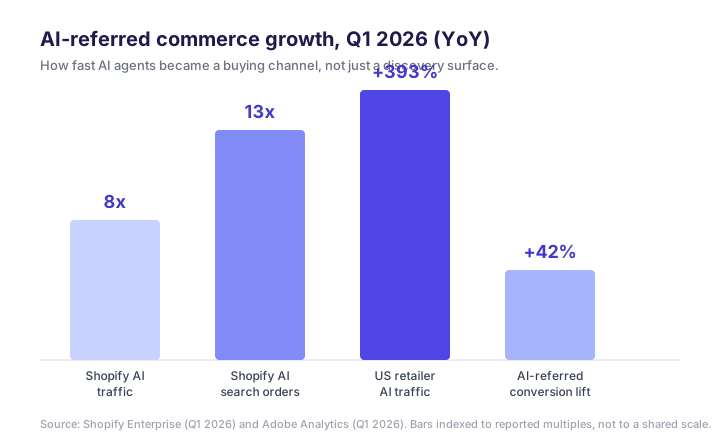
Agentic commerce is the model where an AI agent handles the purchase journey — discovering products, comparing specs, reading reviews, and increasingly completing checkout — on a shopper's behalf. It stopped being a demo in the last year. On Shopify, AI-driven traffic grew roughly 8x year over year in Q1 2026 and orders from AI-powered searches grew nearly 13x, according to Shopify's enterprise team. Adobe's Q1 2026 data found AI-referred shoppers converted about 42% better than the average visitor. Gartner projects 20% of transactions will run through AI platforms by 2030; McKinsey's range for US agentic-commerce retail revenue by 2030 sits near $900 billion to $1 trillion.
The infrastructure caught up in the same window. OpenAI shipped Instant Checkout in ChatGPT, built with Stripe on the open-source Agentic Commerce Protocol (ACP). Google introduced a universal commerce protocol at NRF for agents to query catalogs and complete purchases. Perplexity runs a merchant program. Shopify launched Agentic Storefronts to syndicate products across AI channels from the admin. The pipes exist; what flows through them is your feed.
Here is the uncomfortable part for marketers: the agent never sees your landing page the way a human does. It does not get charmed by the hero video. When an AI agent is asked to shop, it does not want editorial content — it wants structured data it can evaluate, rank, and execute against. A beautifully written 2,000-word product story will not lift your ChatGPT shopping rank as much as a complete, accurate, real-time feed will. The feed is the storefront now.
What "agent-ready" actually means
*Agent-ready product data is structured, machine-parsable, real-time product information that an AI agent or LLM can directly query, interpret, and act on — to recommend and to sell your product. The load-bearing words are machine-parsable and real-time. Most product data was built for a human browsing a website: it lives inside JavaScript-rendered templates, leans on photography to convey what the product is, and describes things in the language of persuasion. An agent cannot use any of that. It needs literal fields it can read without rendering a page, and it needs them to be true right now*, because it may complete a purchase seconds after reading them.
That is a higher bar than "having a Google feed." The gap between what renders nicely for a person and what a machine can consume is where most brands lose. An estimated 60% of ecommerce catalogs carry missing GTINs, inconsistent attributes, or stale inventory — exactly the defects that make an agent quietly skip you in favor of a competitor whose data is clean.
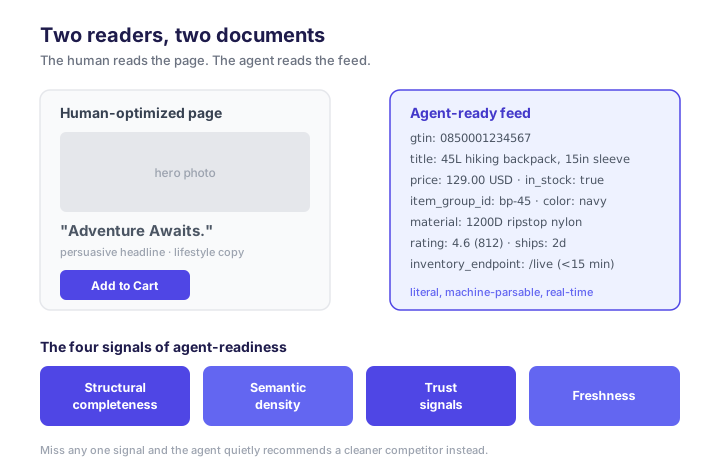
We break agent-readiness into four signals. This is the frame we use on every audit:
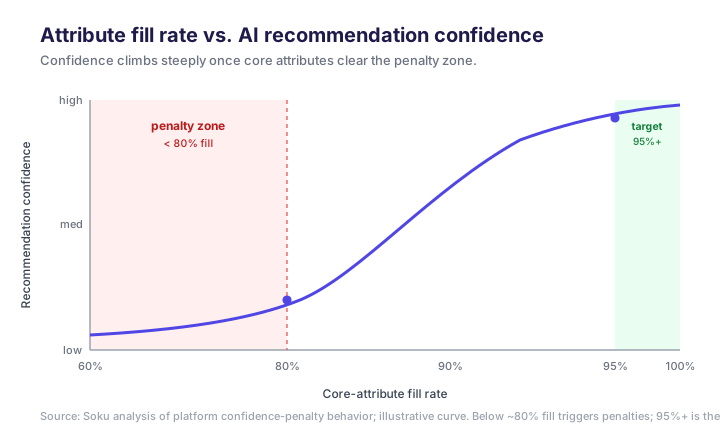
- Structural completeness — every record carries the machine-readable fields an agent needs to answer three questions without guessing: what is this, what does it cost, is it available? The working benchmark is a 95%+ fill rate on core attributes; drop below roughly 80% and platforms start applying confidence penalties — you are still in the catalog, but down-ranked in the recommendation set. Completeness is not glamorous, but it is the single biggest lever most brands have left untouched.
- Semantic density — descriptions written as facts a machine can parse rather than superlatives. The agent matches natural-language queries against literal attributes, not adjectives. Consider two descriptions of the same bag. Low density: "Premium quality backpack, perfect for all your adventures." High density: "45-liter technical hiking backpack with a padded 15-inch laptop sleeve, hydration-bladder compatible, hip-belt load distribution, 1,200-denier ripstop nylon." The first is invisible to a query like "hiking backpack that fits a 15-inch laptop"; the second is a direct hit. The rule: every description carries at least five machine-parseable facts — explicit dimensions, weight or capacity with units, material composition with percentages, and at least one concrete use case.
- Trust signals — GTINs, verified reviews, accurate shipping data, and consistency between your Schema.org markup and your submitted feed. GTINs are the sharpest signal: products without them are excluded from Google's trust-based layers (Performance Max, Gemini recommendations) and get reduced confidence from ChatGPT's commerce engine. When your on-page markup and your feed disagree, the agent treats it as a quality failure.
- Freshness — inventory and price that reflect reality within a tight lag window (the OpenAI and UCP guidance points to 15 minutes). An agent that recommends an item and finds it out of stock at checkout loses trust with the shopper — and platforms quietly down-rank merchants whose data proves unreliable, even after they fix it. Freshness is the one signal you cannot fake with a one-time cleanup.
Why the old "SEO plus nice photos" playbook does not carry over
For a decade, ecommerce marketing meant winning the human: rank in Google's blue links, write persuasive copy, run retargeting. Agent-ready commerce breaks each of those assumptions.
- Ranking is against data, not pages. The agent does not read your blog post about "the best rain jackets." It reads feeds and executes against APIs. A detailed article will not lift your ChatGPT shopping rank the way a complete, accurate feed will. This is the commerce edge of the broader shift we cover in generative engine optimization and GEO vs SEO.
- Persuasion moves to facts. The agent is immune to your headline. It is persuaded by specificity: the fact that the jacket is 3-layer, 20K waterproof, weighs 310 grams, and has 4.6 stars across 800 reviews.
- The feed is the funnel. Discovery, comparison, and conversion increasingly happen inside the AI interface, off your site entirely. If your feed is thin, you are not "lower in the funnel" — you are absent from it.
Why agent-readiness is a marketing problem, not an IT ticket
It is tempting to file "fix the feed" under engineering and move on. That is the mistake. Three of the four signals are marketing decisions in disguise:
- Semantic density is copywriting — deciding which facts matter to which buyer and stating them in parse-able form is a positioning and messaging job.
- Trust signals are merchandising — which products get reviews surfaced, how the catalog is structured, what taxonomy you claim.
- Channel coverage is media strategy — the same clean feed that wins organic AI placement is what makes your paid catalog campaigns (Advantage+, Performance Max, ChatGPT Ads) perform, because those are feed-driven too.
Only freshness is purely a plumbing problem. The rest is the marketing team's leverage — which is exactly why an AI shopping agent reading a thin feed is a marketing failure, not an IT one.
The landscape: where an agent-ready feed goes
There is no single "AI channel." An agent-ready feed fans out to a stack of endpoints, each with its own spec and its own audience. This is the map every merchant should have on the wall:
| Channel | What it feeds | Access model | Notable requirement |
|---|---|---|---|
| Google Merchant Center + AI Mode / Gemini | AI Overviews, Gemini shopping, Search | Feed + Content API | GTIN/identifier compliance; identifier_exists:false if none |
| ChatGPT Shopping (OpenAI Merchant Program) | Product discovery + Instant Checkout in ChatGPT | ACP feed spec, push to endpoint | Title ≤150 chars, description ≤5,000 chars, ISO 4217 price |
| Perplexity Merchant Program | Products inside research answers | Merchant feed | High-intent, information-aligned context |
| Meta Advantage+ Catalog | Advantage+ Shopping, Dynamic Ads, Reels/Stories tags | Catalog feed / pixel | 1:1 imagery, product sets, custom_label structure |
| Open agent endpoints (UCP-style) | Any compliant agent querying live | Live API at .well-known | Real-time query, no feed latency |
Two things stand out for an ad team. First, the same underlying catalog powers both the organic AI surfaces and the paid catalog channels. The feed you clean for ChatGPT Shopping is the feed that makes Advantage+ and Performance Max perform, because those campaigns are now feed-driven too — the algorithm picks the product, so catalog quality is the input you still control. Second, each channel rewards a slightly tailored feed; a generic one-size submission leaves matching quality on the table.
Setup overview
Getting agent-ready is a sequence, not a switch. At a high level:
- Audit where your data actually lives. Pull it out of JavaScript/Liquid-rendered templates into a structured source of truth an agent (or a feed platform) can read directly.
- Fix identifiers first. Achieve 95%+ GTIN coverage; set
identifier_exists:falseon legitimately GTIN-less products instead of leaving the field blank. - Rewrite for semantic density. Give every product a description with at least five machine-parseable facts — dimensions, materials with percentages, at least one concrete use case.
- Structure variants. One parent record, multiple offers, a consistent
item_group_id, so an agent can resolve "that jacket in navy, medium" in a single hop. - Add the structured-data layer. Product, Offer, AggregateRating, shipping and return-policy schema on the page, consistent with the feed.
- Wire freshness. Real-time inventory/price sync via Content API or a live endpoint, inside the 15-minute window.
- Submit per channel and validate to zero errors before you trust the numbers.
The hands-on setup: Google Merchant Center and Meta, step by step
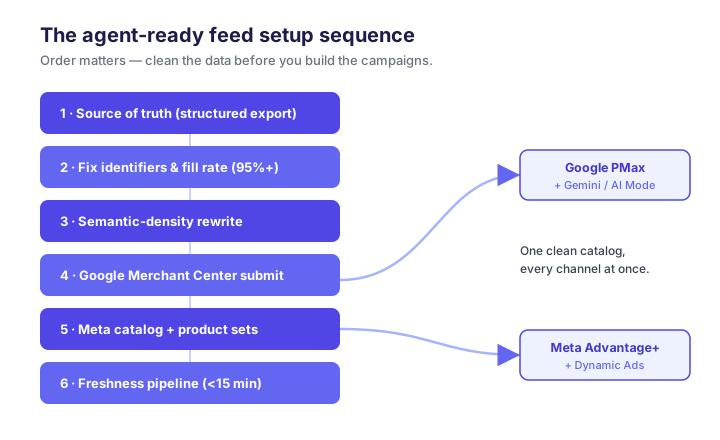
The paid catalog channels — Meta Advantage+ and Google Performance Max — are the fastest on-ramp to agent-ready commerce, for one reason: they run off the same feed the AI shopping surfaces read. Clean your catalog for Google Merchant Center and you have simultaneously fed Gemini and AI Mode; clean it for the Meta catalog and you have fed Advantage+ Shopping. So the smartest first move is not to chase every AI protocol at once — it is to get the two channels you already run into agent-ready shape, and let that same catalog fan out. Order matters: doing these out of sequence — building product sets before the identifiers are clean, say — means redoing work.
Step 1 — Establish one source of truth
Before either platform, get your data out of rendered templates. If a product's attributes only exist inside Liquid or JavaScript on the page, neither a feed platform nor an AI agent can reliably read them. Export to a structured source — a feed file or a database view — where every SKU is a row with literal fields. Practical check: can you produce a CSV/TSV where every active SKU has a non-empty id, title, description, price, availability, image_link, link, and gtin? If not, that is your step-1 work list.
Step 2 — Fix identifiers and fill rate first
Identifiers are the highest-leverage fix, so do them before anything cosmetic. Target 95%+ GTIN coverage on branded, manufactured goods — missing GTINs drop you out of Google's trust layers, and Performance Max eligibility and Gemini recommendations both depend on them. For genuinely identifier-less items (handmade, private-label), set identifier_exists: false; leaving the field blank reads as a defect, declaring it explicitly does not. Then get every core attribute (title, price, availability, brand, category, condition, image, shipping) above 95% populated. Validate in the Merchant Center Diagnostics tab and resolve every error and warning before moving on — a feed with unresolved errors is a feed the algorithm distrusts.
Step 3 — Rewrite titles and descriptions for semantic density
Both the Shopping algorithm and the AI surfaces match queries against the literal facts in your text. Titles: front-load the attributes buyers search — [Brand] [Product] [key attribute] [size/variant]. "Patagonia Torrentshell 3L Rain Jacket — Men's Medium, Black" beats "Torrentshell Jacket." Descriptions: at least five machine-parseable facts — dimensions, materials with percentages, capacity/weight with units, at least one use case. Keep within the OpenAI feed spec's 5,000-character description limit and 150-character title limit, so the same copy carries over to ChatGPT Shopping later.
Step 4 — Submit to Google Merchant Center
With clean data, Google is the higher-volume first channel and it double-duties for the AI surfaces.
- Create/verify your Merchant Center account and verify and claim your domain.
- Submit the feed (Content API push for scale, or a scheduled fetch/feed file to start).
- Resolve all Diagnostics errors and warnings to zero.
- Confirm category is mapped to Google's product taxonomy and
conditionis set. - Link Merchant Center to Google Ads and stand up your Performance Max / Shopping campaign against the approved feed.
At this point your feed is simultaneously eligible for paid Shopping/PMax and for AI Mode and Gemini surfacing — one clean feed, two payoffs.
Step 5 — Build the Meta catalog and product sets
Meta's catalog is the equivalent of Merchant Center inside Meta, and it powers Advantage+ Shopping and Dynamic Ads.
- Create the Commerce Manager catalog and connect your feed (URL import, Partner Integration, or pixel-based for Shopify/WooCommerce).
- Meet Meta's media rules — 1:1 imagery for Dynamic Ads, correct currency and localized language.
- Connect the Meta Pixel and verify
ViewContent,AddToCart, andPurchaseevents fire correctly — Advantage+ optimization is only as good as its signal. - Structure product sets rather than dumping the whole catalog into one campaign.
The product-set structure is where Meta's 2026 SKU-level controls earn their keep. Group SKUs with custom_label fields so you can steer budget to the tiers that matter instead of letting the algorithm spread evenly.
The custom_label mapping we use
custom_label_0 through custom_label_4 are free-form — the discipline is in using them consistently. This mapping works across both Meta and Google:
| Field | Dimension | Example values | Why it matters |
|---|---|---|---|
custom_label_0 | Performance tier | hero, core, longtail | Steer budget to proven SKUs |
custom_label_1 | Margin band | high, mid, low | Bid harder where profit is |
custom_label_2 | Stock health | in_stock, low, clearance | Suppress near-OOS from agents/ads |
custom_label_3 | Seasonality | evergreen, seasonal, new | Time promotions and launches |
custom_label_4 | Price bucket | under50, 50to150, premium | Match query intent bands |
Backfill these on every active SKU in the master catalog first, then build sets against them in Commerce Manager, verify membership counts, and split campaigns to mirror your historical performance-tier spend. Because the same labels live in the Google feed, your PMax structure can mirror your Meta structure — one taxonomy, two channels.
Step 6 — Wire the freshness pipeline
This is the step teams skip, and it is the one that carries a lasting penalty. Price and availability must reflect reality within a 15-minute lag — real-time Content API pushes on Google, real-time catalog updates on Meta. Out-of-stock or price mismatches don't just waste an impression; they depress your merchant reliability score, and that penalty persists after the fix. Set the sync up once, correctly, and monitor it.
Step 7 — Extend to the AI-native surfaces
Once Google and Meta are clean, the marginal cost of the AI-native channels is low, because the hard work — clean identifiers, dense descriptions, fresh inventory — is done. Enroll in the OpenAI Merchant Program (the ChatGPT Ads product-feed workflow walks this in detail), and add Perplexity's merchant program. Each rewards a slightly tailored feed, but you are tuning a clean catalog, not rebuilding one. Finally, add the structured-data layer — Product, Offer, AggregateRating, shipping and return-policy schema on the page, consistent with the feed.
Common setup mistakes
- Building product sets before identifiers are clean — you will rebuild them. Fix data first.
- Leaving GTIN blank instead of
identifier_exists:false— a silent eligibility killer. - Ignoring the Diagnostics warnings (not just errors) — warnings are down-rank signals.
- One giant product set — you forfeit SKU-level budget control and let low-margin junk absorb spend.
- No freshness sync — the mistake with the longest tail, because the trust penalty outlives the fix.
How to choose your approach, ranked by setup time
Everyone agrees you need an agent-ready catalog. Nobody agrees on how to get one. You can hand-fix a spreadsheet, lean on native store connectors, buy a feed-management platform, adopt a dedicated agentic-commerce tool, or hand the whole thing to an AI ad agent. They land in wildly different places on the one axis a busy team feels first: how long until it actually works. So we ran the comparison instead of hand-waving it, scoring all five approaches against a weighted rubric — using a representative mid-size Shopify catalog (~2,000 SKUs) as the test case.
How we scored the approaches
We weighted four criteria to reflect what a lean ecommerce team actually optimizes for. Setup time dominates because most teams stall before they ever reach "optimized."
| Criterion | Weight | What it measures |
|---|---|---|
| Setup time | 40% | Days from start to a validated, live feed across channels |
| Channel coverage | 25% | Paid (Meta/Google) + AI-native (ChatGPT, Gemini, Perplexity, open agents) |
| Freshness automation | 20% | Can it hold the sub-15-minute inventory/price lag without a human? |
| Ongoing maintenance | 15% | Human hours per week to keep it clean as the catalog churns |
Each approach scored 1–10 per criterion; the weighted total is out of 10. The scores reflect our test on the sample catalog and our operating experience — treat them as directional, not laboratory-precise.
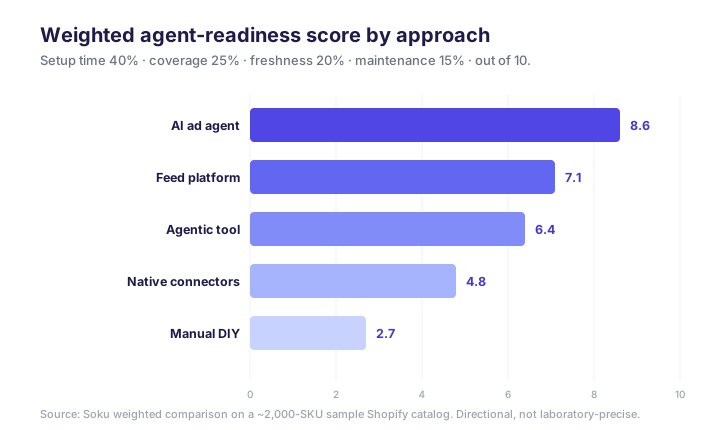
The ranking
1. AI ad agent — weighted 8.6 (fastest to real coverage). An AI ad agent (Soku's category) audits the catalog, fixes the blocking fields, syndicates to every channel, and then runs the campaigns off the same clean feed. Because one system owns audit-through-media-buying, there is no hand-off between a "feed tool" and a "campaign tool," which is where most setup time evaporates. Setup is days, coverage spans paid catalog channels and the AI-native surfaces, freshness is automated by design, and maintenance is near-zero. Best for: teams that want the catalog and the campaigns handled without assembling martech. The trade-off: you are trusting an agent with an operating loop, so you want one with real audit transparency and guardrails.
2. Feed-management platform — weighted 7.1 (broadest coverage, heavier lift). Feedonomics, Productsup, Channable-class tools transform one source into per-channel feeds and cover a lot of endpoints well. Coverage is their strength; setup (weeks of mapping rules, transformations, and per-channel validation) and the subscription are the tax. Best for: larger catalogs and teams with a dedicated feed owner.
3. Dedicated agentic-commerce tool — weighted 6.4 (AI-visibility specialist). The Ryze/Goodie category is purpose-built for AI discoverability — auto schema, feed fixes, crawler permissions. It nails the organic AI surfaces but is narrower on the paid-media operating side, so you often still need a separate campaign motion. Setup runs days to a couple of weeks; some report ~4 weeks to full AI readiness. Best for: brands whose priority is organic AI visibility over paid catalog scale.
4. Native platform connectors — weighted 4.8 (fast start, hard ceiling). The built-in Shopify → Google/Meta connectors are the fastest thing to switch on, and that is their trap: they get you paid-channel eligibility in hours but stop there, leaving the ACP/Perplexity/open-agent surfaces empty and doing little to improve data quality — you still hand-fix identifiers and density. Best for: the day-one baseline before you invest further, not a destination.
5. Manual DIY — weighted 2.7 (only viable at tiny scale). A person maintaining a spreadsheet and per-channel uploads. It technically works for a few dozen SKUs and nothing else — it is slow, never done, and freshness at the 15-minute bar is effectively impossible by hand. Best for: micro-catalogs, or learning the mechanics before automating.
The setup-time story, isolated
Because setup time is what stalls teams, it is worth looking at on its own. The gap between "started" and "agent-ready across channels" is enormous, and it is where the DIY and native-connector paths quietly fail — they get you to a live feed fast and to a good feed never.
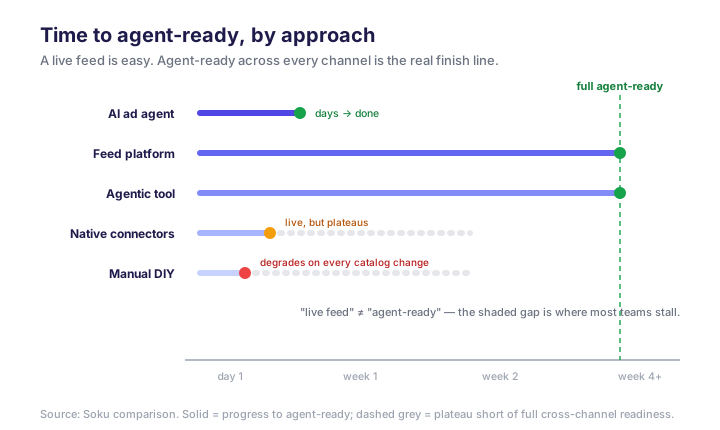
The rubric collapses into a few honest recommendations: if you want catalog and campaigns handled, an AI ad agent is the fastest path to real, maintained coverage; a large catalog with a dedicated feed owner justifies a feed-management platform; a pure organic-AI-visibility goal fits a dedicated agentic-commerce tool paired with a separate paid motion; a same-day baseline means turning on native connectors today but planning the next step now; and 40 SKUs means DIY, briefly, then graduate.
The honest limitations
Agent-ready commerce is early, and pretending otherwise helps no one:
- Attribution is immature. AI-referred sessions are still hard to isolate cleanly; you will be stitching GA4 referral data (
chatgpt.com,perplexity.ai) with platform reports for a while. Our guide to measuring AI ad creative ROI covers how to build a measurement stack that survives channels like this. - Specs are moving. ACP, Google's protocol, and platform feed specs are all being revised in the open. A feed you perfect this quarter needs maintenance next quarter.
- Trust penalties are sticky. Get flagged for out-of-stock mismatches and your merchant reliability score can stay depressed even after you fix the data. Freshness is not optional.
- Coverage ≠ conversion. Getting into the recommendation set is necessary, not sufficient; price, reviews, and shipping still decide the sale.
What happened when we tested the pipeline
Most writing on agent-ready feeds is a checklist, and checklists never tell you which items actually move the needle. So we stopped theorizing and ran the pipeline: we took a representative mid-size catalog, made it agent-ready in stages, pointed ad automation at it, and watched what happened — including the parts that broke.
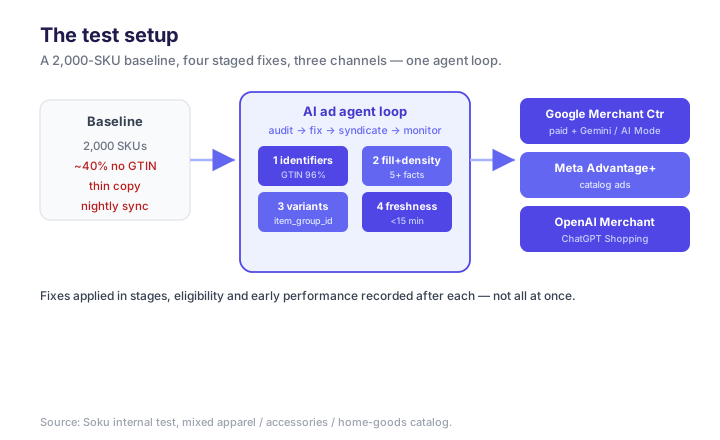
The test resembled a real store, not a clean-room demo:
- Catalog: ~2,000 SKUs across apparel, accessories, and home goods — the kind of mixed catalog where identifier hygiene and variant structure actually matter.
- Starting state: a typical "we have a Google feed" baseline — connectors live, but ~40% of SKUs missing GTINs, thin marketing-copy descriptions, no consistent variant grouping, and a nightly (not real-time) inventory sync.
- Channels: Google Merchant Center (paid Shopping/PMax + Gemini/AI Mode surfacing), Meta Advantage+, and the OpenAI Merchant Program feed for ChatGPT Shopping.
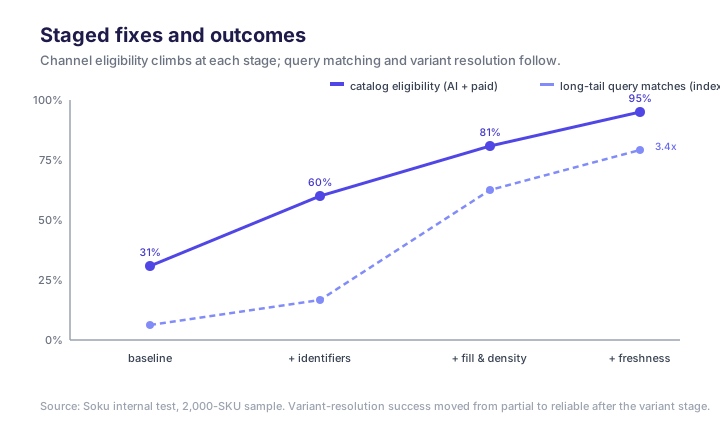
- Method: we applied the fixes in stages — identifiers, then fill rate and semantic density, then variant architecture, then real-time freshness — and recorded channel eligibility and early performance after each stage, rather than changing everything at once.
What actually worked
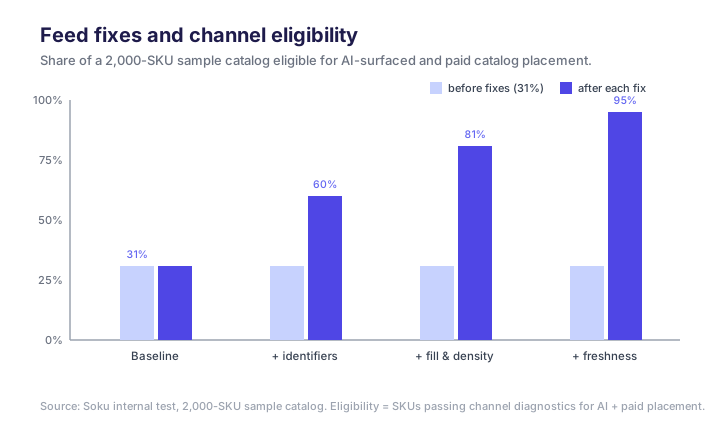
Fixing identifiers was the single biggest unlock. Nothing else came close. Bringing GTIN coverage from ~60% to ~96% (and setting identifier_exists: false correctly on the legitimately code-less handmade items) moved roughly a third of the catalog out of the "excluded from trust layers" bucket and into eligibility for Performance Max and Gemini recommendations in one stage. If you do one thing, do this one.
*Semantic density changed what we ranked for, not just whether we ranked.* Rewriting descriptions from marketing prose to fact-dense copy did something subtler than lift a single rank: it widened the set of queries we matched. A backpack described as "premium and versatile" matched almost nothing; the same SKU rewritten as "45L, padded 15-inch laptop sleeve, hydration-compatible, 1,200D ripstop" started appearing for specific long-tail shopping intents. Density is not about ranking higher for your head term — it is about becoming eligible for the hundred specific questions agents actually get asked.
Variant architecture fixed the "which one?" failure. Before we grouped variants under parent records with a consistent item_group_id, agents handled a query like "that jacket in navy, medium" poorly — they surfaced the wrong variant or dropped the product. After grouping, single-hop variant resolution worked. This is invisible in a feed-error count but very visible in whether an agent can complete the shopper's request.
Sharing one clean feed across paid and AI surfaces compounded. Because the paid catalog campaigns and the AI surfaces read the same catalog, every fix paid twice. The identifier cleanup that unlocked Gemini placement also lifted Performance Max eligibility; the density rewrite that widened AI query matching also improved Shopping ad relevance. Running the feed and the campaigns as one loop — rather than a feed tool feeding a separate campaign tool — is what made the fixes compound instead of stack.
What broke
A stale nightly sync poisoned trust before we fixed freshness. In the window before we moved to real-time inventory, a batch of SKUs sold out mid-day and kept getting recommended by agents against a nightly-stale feed. Shoppers hit out-of-stock after the agent had already recommended us. Those SKUs stayed down-ranked for a stretch even after we restocked and moved to a 15-minute sync. The freshness penalty is real and sticky. If we ran the test again, we would wire real-time sync first, not last.
Feed "warnings" we ignored were quietly costing eligibility. We initially triaged only hard errors in Merchant Center Diagnostics and left warnings for later. That was a mistake — several warning-level issues (missing recommended attributes, soft policy flags) were suppressing SKUs from the richer AI-surfaced placements even though they technically "passed." Treat warnings as down-rank signals and clear them.
One-size feed submission underperformed per-channel tuning. Our first pass pushed a single generic feed everywhere. ChatGPT Shopping, which leans on conversational descriptions, FAQ-style data, and review signals, visibly underperformed until we tailored the feed to what that surface rewards. A generic submission is a real placement tax versus a lightly tailored one — the same clean catalog, tuned per channel, not rebuilt.
Reading the reliability signal in practice
The reliability penalty is the least-understood part of agentic commerce, so it is worth being concrete about how it shows up. You do not get a dashboard labeled "your trust score." What you see are second-order symptoms:
- A restocked SKU that stays quiet. After the sold-out episode, several SKUs we restocked did not immediately return to the AI-surfaced placements they'd held. Impressions stayed suppressed for days after the data was correct — the tell that a reliability penalty was still working through.
- Eligibility that passes but placement that doesn't materialize. A SKU can clear Diagnostics (no errors) and still not surface, because "eligible" and "trusted enough to recommend" are different thresholds. That gap is the reliability signal talking.
- Recovery that tracks consistency, not a single fix. The SKUs recovered as we demonstrated sustained accurate availability, not the moment we flipped one setting. Consistency over time is what the platforms reward.
The practical implication: instrument for it. We watched restored-SKU impression recovery and out-of-stock recommendation rate as leading indicators, alongside GA4 referral segments for chatgpt.com and perplexity.ai, rather than waiting for revenue to tell us something was wrong. If you cannot see the penalty forming, you cannot sequence around it — which is the whole argument for wiring freshness first.
The operating model: a feed is a loop, not a project
The single biggest mistake we see is treating "agent-ready" as a one-time cleanup. It is a continuous loop: your catalog changes (prices, stock, new SKUs, retirements), each AI channel scores your data reliability over time, and stale or inconsistent data quietly costs you rank. The teams that win run the loop on a cadence — audit, fix, syndicate, monitor, repeat — rather than shipping a feed and forgetting it.
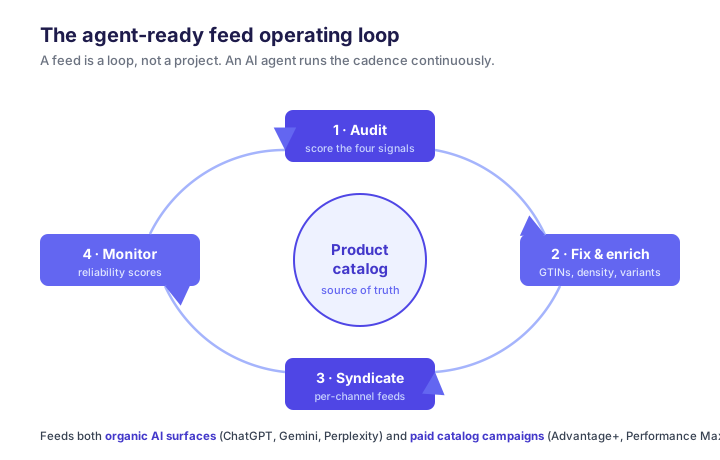
This is exactly the kind of work that does not scale by hand. A 5,000-SKU catalog changing daily is not a spreadsheet job; it is an automation job. Which is where the agent comes in.
How Soku fits
Soku is an AI ads agent, and an agent-ready feed is the substrate its whole job runs on. Instead of a human maintaining feeds and a separate human buying media, the agent does both from one place: it audits your catalog against the four signals above, fixes the fields that block AI buyers (missing identifiers, thin descriptions, orphaned variants), syndicates to the channels that matter, and then runs the paid catalog campaigns — Advantage+, Performance Max, ChatGPT Ads Product Feed campaigns — off the same clean source of truth, keeping creative fresh per SKU. Because the feed and the campaigns share one loop, a price change or a stockout propagates everywhere at once, instead of leaving one channel advertising a product you cannot ship.
If you already run catalog-driven ads, the transferable-skills story is strong: the discipline that made you good at Shopping transfers almost directly to the AI surfaces — see our walkthrough of ChatGPT Ads product-feed campaigns and how Performance Max leans on feed and asset quality.
The agent-ready field checklist
If you want a single reference to audit against, this is the field-level bar we hold catalogs to. The first block is table stakes on every channel; the second is what separates "in the catalog" from "actually recommended."
| Field / attribute | Tier | Bar |
|---|---|---|
id, title, link, image_link | Core | 100% populated, title ≤150 chars, attribute-front-loaded |
price, sale_price, availability | Core | Accurate, ISO 4217 currency, synced ≤15 min |
gtin / identifier_exists | Trust | 95%+ GTIN coverage; identifier_exists:false where none |
brand, google_product_category, condition | Core | Real taxonomy, not free text |
description | Density | 5+ machine-parseable facts, ≤5,000 chars, no superlatives |
item_group_id + variant attributes (color, size) | Structure | Parent-child grouping so agents resolve variants in one hop |
shipping, return-policy fields | Trust | Structured transit time, cost, return window |
custom_label_0–4 | Ops | Consistent performance/margin/stock taxonomy across channels |
Schema.org Product/Offer/AggregateRating on-page | Trust | Consistent with the submitted feed |
Score yourself honestly against it. Most catalogs pass the core block and fail on density, identifiers, or freshness — which is exactly where the recommendation decisions get made.
For the broader context, this connects to the generative engine optimization guide and the GEO vs SEO shift — agent-ready feeds are GEO for the commerce layer.
FAQ
Is an agent-ready feed different from my Google Shopping feed?
It is a superset. A clean Google Merchant Center feed is the foundation, but agent-readiness adds the ACP/OpenAI feed spec, per-channel semantic tuning, a structured-data layer consistent with the feed, and sub-15-minute freshness. Same catalog, higher bar.
Do I need a GTIN for every product?
For branded, manufactured goods, yes — missing GTINs drop you out of Google's trust layers and Gemini recommendations. For legitimately GTIN-less products (handmade, private-label), set identifier_exists:false rather than leaving the field blank.
Which channel should I prioritize?
Start with Google Merchant Center (highest volume and it also feeds your paid Shopping/PMax) and ChatGPT Shopping via the OpenAI Merchant Program. Add Perplexity and open agent endpoints once those two are clean.
How fresh does inventory data need to be?
Treat 15 minutes as the maximum lag for price and availability. High-velocity SKUs want real-time API sync. Out-of-stock mismatches carry a lasting trust penalty.
How long does getting agent-ready take?
For a mid-size catalog, the data work (source of truth, identifiers, density) is the bulk of it; the platform submissions are hours, not days, once data is clean, and the freshness pipeline is a one-time engineering setup. Tooling and an AI ad agent compress the data work — that is why they rank fastest to full cross-channel coverage.
What was the highest-ROI fix in your test?
Identifiers, decisively — bringing GTIN coverage to ~96% moved roughly a third of the catalog into trust-layer eligibility from a single stage.
What's the single highest-leverage step?
Identifiers and fill rate. Nothing downstream performs if the feed is distrusted at the identifier layer, so getting core attributes to 95%+ and setting identifier_exists correctly moves you out of the penalty zone faster than any copy rewrite.
Can I combine approaches?
Yes — a common pattern is native connectors on day one, then an AI ad agent to take over the loop. The goal is to not stay on the fast-start-only paths.
Can I automate all of this?
Yes — and at any real catalog size you should. The audit-fix-syndicate-monitor loop is what an AI ads agent like Soku is built to run continuously, so your feed stays agent-ready without a person babysitting it.